Set the rule: no corporate laptops, and no VPN. Everyone works from the phone and the computer they already own, and there is no network anyone logs onto. A BYOD enterprise with no VPN is buildable, and it can be more locked down than the company handing out a managed laptop to every hire, because it is forced to stop relying on the two things that were never as trustworthy as they looked: the device and the network.
This started as a thought exercise. Employees increasingly want to work on devices they already own, and the business is staring at the real money it spends on laptops, refresh cycles, and the IT operation that keeps them imaged. Both want to know if the security the managed laptop was supposed to buy can come from somewhere else.
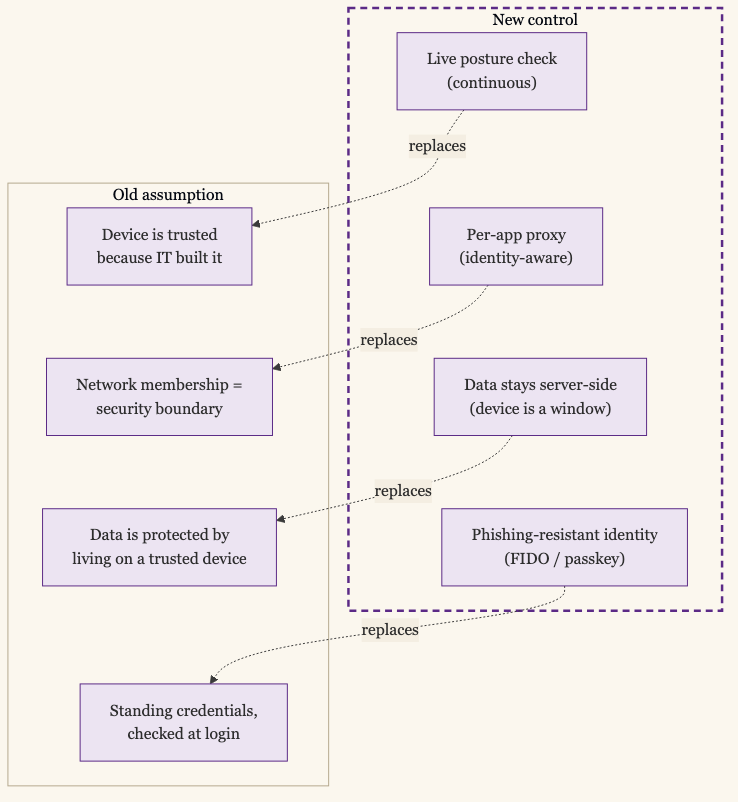
The old model trusted both. The corporate laptop was trusted because IT built it, and the network was trusted because a VPN put you inside it.
Two Assumptions to Give Up
Everything in the old enterprise rested on two assumptions, and both are weaker than they were sold as.
The first is that a managed device is a trusted device. A corporate laptop is patched, encrypted, and running your EDR, which is real, but it is still a general-purpose computer that browses the web and runs whatever its user installs, and “we built it” is not the same as “it is clean.” The device’s posture matters more than its provenance, and posture is a live fact, not a one-time fact of who imaged it.
The second is that being on the network means something. A VPN authenticates you to a network and then trusts you on all of it, which is exactly how one compromised endpoint reaches everything. The network was never the security boundary it pretended to be.
Give up both, and BYOD-without-a-VPN stops being a compromise. It is what is left once you stop trusting the things that did not deserve it.
The Endpoint Is a Window, Not a Safe
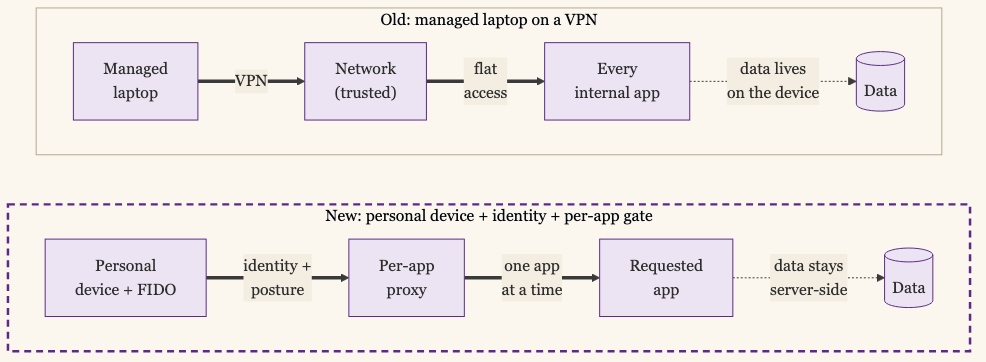
The move that makes the rest safe is to stop letting corporate data live on the device at all. If the personal laptop holds nothing, then a lost laptop, a compromised laptop, a laptop sold on a marketplace two years later, is a bounded event, because there is nothing on it to lose.
So the endpoint becomes a window onto data that lives elsewhere, not a safe that stores it. The work happens in the browser against apps that keep their data server-side, in a virtual desktop streamed pixel by pixel from your cloud, or inside a managed app container that encrypts what it holds and can be wiped without touching the user’s photos. The personal device renders the work. It does not retain it. Where the data lives and how it is classified becomes the control, because the device is no longer where the data is.
The managed-laptop model protected the device because the data was on it. The BYOD model does not need to protect the device, because the data never arrives.
Identity Does What the Perimeter Did
With no trusted device and no trusted network, the access decision has to rest on identity, and the identity has to be one an attacker cannot phish. Phishing-resistant authentication, a passkey or a hardware key, is the load-bearing control here, because it is the one factor that holds up when the user is on a device and a network you do not control. The single piece of corporate hardware worth issuing in this world is a FIDO2 key, which costs less than a laptop and is the thing the whole model leans on.
Every request is then a decision about who and what: a proven identity, and a device healthy enough for what is being reached. That is the user-plus-device pair doing the work the perimeter used to, except now neither half assumes a corporate-owned anything.
Per-App Access Replaces the VPN
With the VPN gone, access goes one application at a time. An identity-aware proxy, the ZTNA pattern, sits in front of each internal app and grants a connection to that one app after checking the identity and the device, with the rest of the estate invisible. There is no network to land on, so a compromised personal device reaches the one app its user was entitled to and has nothing to scan or move toward. Google’s BeyondCorp is the reference build, designed for exactly this case: employees working from untrusted networks with no VPN. In practice you buy the broker rather than build BeyondCorp: Cloudflare Access, Zscaler Private Access, and Netskope Private Access sit in front of internal apps and run the identity and device check before granting a connection. The enterprise-browser vendors push the same gate into the tab for work that never leaves the browser: Island and Palo Alto’s Prisma Access Browser (the old Talon) are purpose-built; Chrome Enterprise Premium and Microsoft Edge for Business layer the same policy into a browser people already use.
For the apps that are SaaS to begin with, there was never a network in the path. They are reached over the internet, gated by your identity provider, and the device check is added at that gate. The internal apps are the ones that needed the VPN, and the broker is what replaces it.
Trusting a Device You Don’t Manage
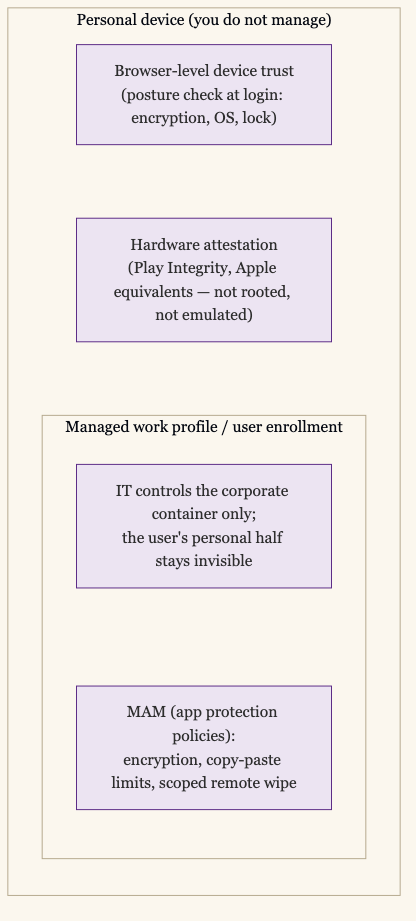
The genuinely hard part is device posture on hardware you do not own. You cannot wipe a personal phone, inventory its software, or run your EDR on it, and you should not want to. The answer is to check and contain the work, not the device.
A few mechanisms do this without full management. A managed work profile or user enrollment carves the corporate apps and data into a container that IT controls and the user’s personal half IT never sees; Apple and Android both build for exactly this split. Application protection policies, or Mobile Application Management (MAM), enforce encryption, copy-paste limits, and a remote wipe scoped to the work container, again without claiming the whole device. Hardware attestation, Play Integrity on Android or the equivalent on Apple silicon, lets the device prove it is not rooted or emulated even though you do not manage it. And browser-level device trust reads posture, disk encryption, OS version, screen lock, at the moment of login and blocks the sign-in if the device fails, which covers the work that happens entirely in a browser tab.
None of these is as strong a signal as a fully managed laptop, and that is the honest cost. You are trading some assurance for the ability to run on devices you do not own, and for respecting a privacy boundary a managed laptop ignores. For most of the workforce, that trade is correct.
Continuous, Because the Device Isn’t Yours
Because you do not control the personal device, a check at login is not enough; its state can change five minutes later. So the posture decision has to be continuous, re-evaluated as signals arrive. The device falls out of compliance, the attestation fails, the risk score jumps, and access is narrowed or cut in near-real-time, without waiting for the session to expire. On a device you manage you can afford to check less often. On one you do not, continuous evaluation is what stands in for the control you gave up.
Where You Still Hand Out Hardware
This is the baseline, not the universal answer, and the model is better for admitting where it does not reach.
The accounts that can damage everything, the cloud admins, the people with standing access to the crown jewels, should be on a hardware key and often a managed device, because the highest-blast-radius identities get the strongest controls regardless of convenience. Some regulated data carries handling requirements a personal device cannot meet, and the answer there is a managed endpoint or a virtual desktop that keeps the data off the device entirely. The posture signals on a personal device are genuinely weaker, and you are choosing less visibility in exchange for reach and for not surveilling your employees’ own hardware. Virtual desktops cost money and add latency some work will not tolerate. And the legacy app that assumes it is on a flat network fits none of this; it gets a broker in front of it or a place on the retirement list. The optionally-provisioned part of the model is where these live: hand out the managed machine where the risk demands it, and let everyone else bring their own.
Developer workstations are the obvious in-between case. Checking out code, running local builds, and using a real IDE all require data on the device by definition, and a virtual desktop is a poor substitute for an SSD and 16GB of RAM the IDE has a direct path to. The two honest answers are a managed laptop for developers, or a cloud development environment — GitHub Codespaces, Gitpod, Coder — where the code lives in a remote container and the local device is again a window onto it, this time over an editor protocol. Either keeps the data off the personal device; the choice is which trade-off you prefer. The cloud option is becoming more workable as AI writes more of the code, because reviewing what an agent produced does not depend on the millisecond IDE responsiveness that typing every line did.
Hardware You Never Bought
A company can hand out no laptops and run no VPN and still be harder to breach than the one with a managed machine on every desk and a concentrator at the edge, because the managed machine and the VPN were protecting the wrong things. What was worth protecting was the data and the identity, and both can live somewhere the personal device only ever borrows a view of.
Make the endpoint a window. Put the trust in an identity that cannot be phished and a posture you check continuously, reach apps one at a time instead of a network all at once, and keep the data off the device that holds the view. What is left is a secure enterprise that happens to run on hardware you never bought.